Prerequisites
- Windows – 7,8,10
- IDE – Intellij Community Edition
- Java version – 1.8
- Maven
Project requirement
Develop a multiple page window application using JavaFx. Use Scene Builder app to design front-end and RESTAPIs endpoints, process JSON to get data and populate in containers and controls. Show complete testresults, single patient testresults and quality control showing statistics, LJcharts, DataTable vertical view and horizontal view and NOVA screens. Configure into a deployable jar using maven.
Project Structure
Project follows maven structure
Each page in the application will have a FXML file and related controller file. We can find all the controller java files in the following path. Path => Chemolimsmini\src\main\java\ChemoLIMS\mini\ui.
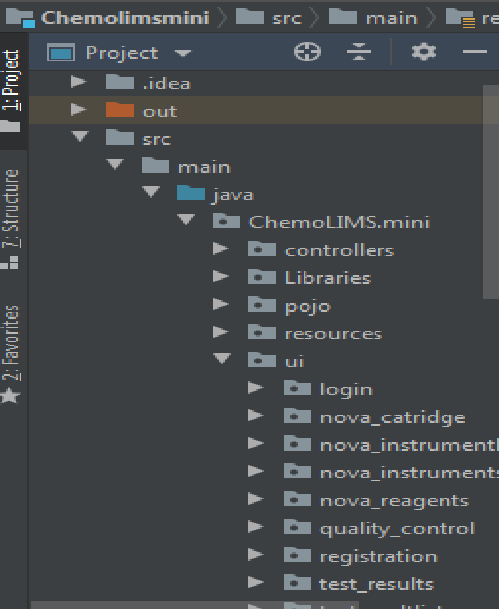
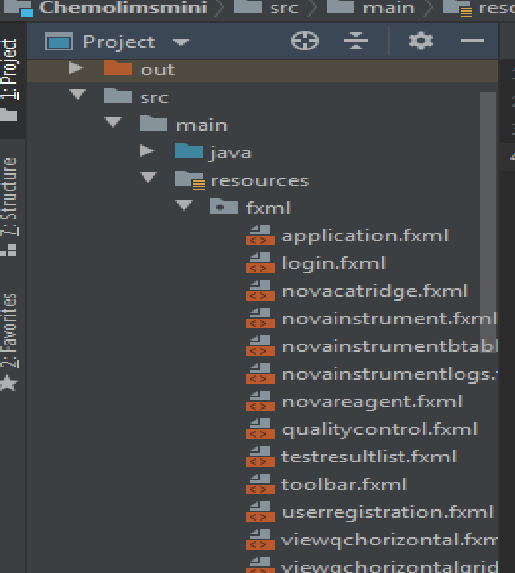
We can find all the FXML files in the following path. Path => Chemolimsmini\src\main\resources\fxml.
POJO classes(Model) to map the json is at the following path. Path => Chemolimsmini\src\main\java\ChemoLIMS\mini\pojo.
External Jars used for feature development is placed at the following location. Path => Chemolimsmini\src\main\java\ChemoLIMS\mini\Libraries
Images, icon and other resources were stored in the following path. Path => Chemolimsmini\src\main\resources\resrc
RestClient
RestClient allows you to send authenticated HTTP requests to a server. It is the entry point for all rest service operations.The RestClient.java can be found in the following path. Path => Chemolimsmini\src\main\java\ChemoLIMS\mini\controllers\RestClient.java
Global Variables
Since we are using endpoints to get data and accessing server with both internal and external IP it is recommended to declare the domain globally as a variable. Some of the globally declared variables are as follows.
public static RestClient restClient = new RestClient();
public static ObjectMapper mapper = new ObjectMapper();
public static String endpointurl = "http://chemolims.chemopharm.com";
public static String endpointurl = "http://cidevsvr";
These variables are declared globally in the following location. Chemolimsmini\src\main\java\ChemoLIMS\mini\controllers\GlobalVariables.java
Application Theme
The theme of application classified into two(dark theme and light theme).It is an user configurable theme, an user can select the theme type before logging in.
Application Css
We are using custom css for styling the application. Included two css files one for the dark mode and another for light mode. The following css files can be found at the below location.
Dark Theme => Chemolimsmini\src\main\resources\StyleSheets\darkcss\style.css
LightTheme => Chemolimsmini\src\main\resources\StyleSheets\lightcss\stylelight.css
Selectors used in css files are mainly based on id,element,class.
For example, All the button in the application should follow same color pattern can be coded as below.
.button{
    -fx-background-color: #005288;
    -fx-text-fill:#ffffff;
}
Styling a button to show unique has been coded as
#buttonid{
    -fx-border-color: white;
    -fx-background-color: #3c3f41;
}
External Jars
The application uses several jars for enhancement. The below are some of the jars and its purpose.
jackson-annotations-2.10.0.pr3 => Jackson is a simple java based library to serialize java objects to JSON and vice versa.
jackson-databind-2.10.0.pr3 => Data Binding API is used to convert JSON to and from POJO (Plain Old Java Object) using property accessor or using annotations.
jackson-core-2.10.0.pr3 => catch JsonProcessingException.
itextpdf-5.5.13.1 => Generate PDF files and show reports including datatable, LJcharts, Statistics. Theme selection also done using creating PDF file.
jfoenix-8.0.8 – Scene Builder element – Navigation drawer and hamburger functionality.
spring-core-5.1.5.RELEASE, slf4j, spring-jcl-5.1.5.RELEASE, spring-web-5.1.5.RELEASE, spring-beans-5.1.5.RELEASE,spring-context-5.1.5.RELEASE=> RestClient Execution.
poi-4.1.2 => Generate excel sheets with datatable value.
Containers and Controls used
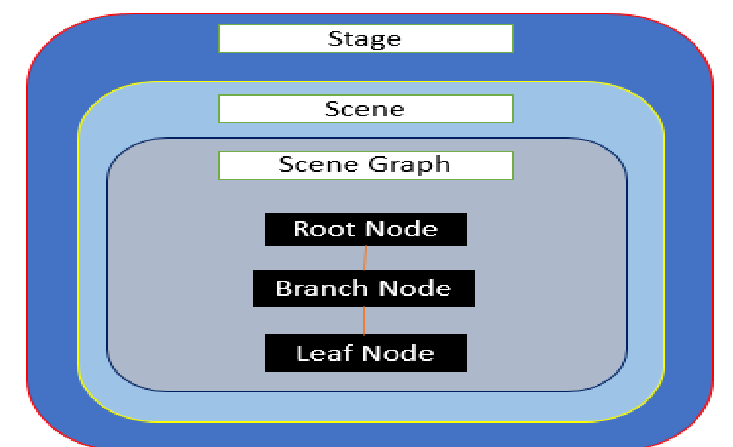
- Stage – A stage (a window) contains all the objects of a JavaFX application. It is represented by Stage class of the package javafx.stage.
- Scene – A scene represents the physical contents of a JavaFX application. It contains all the contents of a scene graph.
- Scene Graph and Nodes – The Node Class of the package javafx.scene represents a node in JavaFX, this class is the super class of all the nodes.
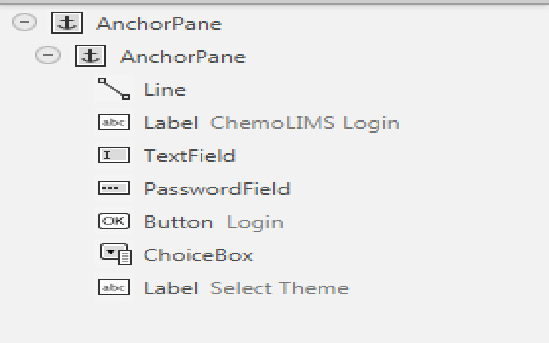
Login Page
- Containers -> AnchorPane.
- Controls -> Label, TextField, Buttons, ChoiceBox.
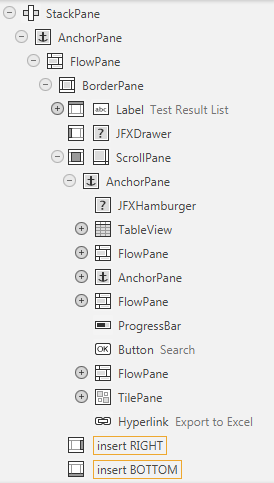
TestResultList
- Containers -> StackPane, AnchorPane, FlowPane, BorderPane, ScrollPane, JFXDrawer.
- Controls -> Label, TextField, Buttons, ChoiceBox, TableView, ProgressBar, Hamburger, TableColumn.
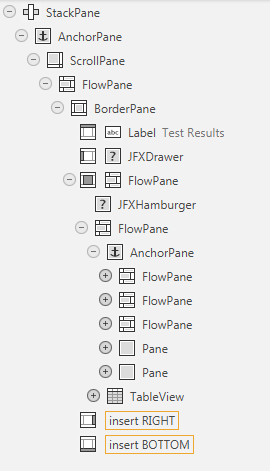
Patient TestResults
- Containers -> StackPane, AnchorPane, FlowPane, BorderPane, ScrollPane, JFXDrawer.
- Controls -> Label, TextField, Buttons, ChoiceBox, TableView, ProgressBar, Hamburger, TableColumn.
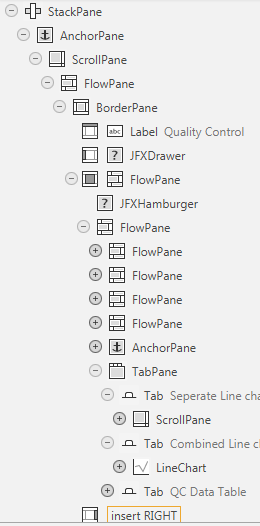
Quality Control
- Containers -> StackPane, AnchorPane, FlowPane, BorderPane, ScrollPane, JFXDrawer, TabPane, Tab, TilePane.
- Controls -> Label, TextField, Buttons, ChoiceBox, TableView, ProgressBar, Hamburger, TableColumn, LineChart.
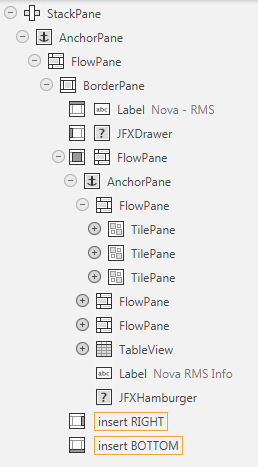
Nova Screens
- Containers -> StackPane, AnchorPane, FlowPane, BorderPane, ScrollPane, JFXDrawer, TilePane.
- Controls -> Label, TextField, Buttons, TableView, Hamburger, TableColumn.
Deployable Jar Configuration
Deployable jar can be configured by two ways.
Application follows Maven Structure and on executing maven lifecycle it will generate a jar inside the target folder.
Intellij provides an option to create an executable jar with adding external dependencies.
Here we are using the second approach to create jar. Have to execute the following steps in Intellij to generate the deployable jar.
File -> Project Structure -> Artifacts -> JAR -> from modules with dependencies.
Opens a pop-up window, Select Main Class(ChemoLIMS.mini.Main.java) -> Select the external dependencies which needs to be included. Click Apply and Ok.
The Executable jar with dependencies generated in the following path. Chemolimsmini\out\artifacts\chemolimsmini\chemolimsmini.jar
If any code modifications done in java or fxml files after creating jar and needs to be updated in jar, can follow the steps to do.
in Intellij, Build -> Build Artifacts -> chemolimsmini(Jar name) -> Rebuild. Will reproduce the jar updated and locate in the same path.
The optimal resolution for the application is 1366 x 768.
